Introduction
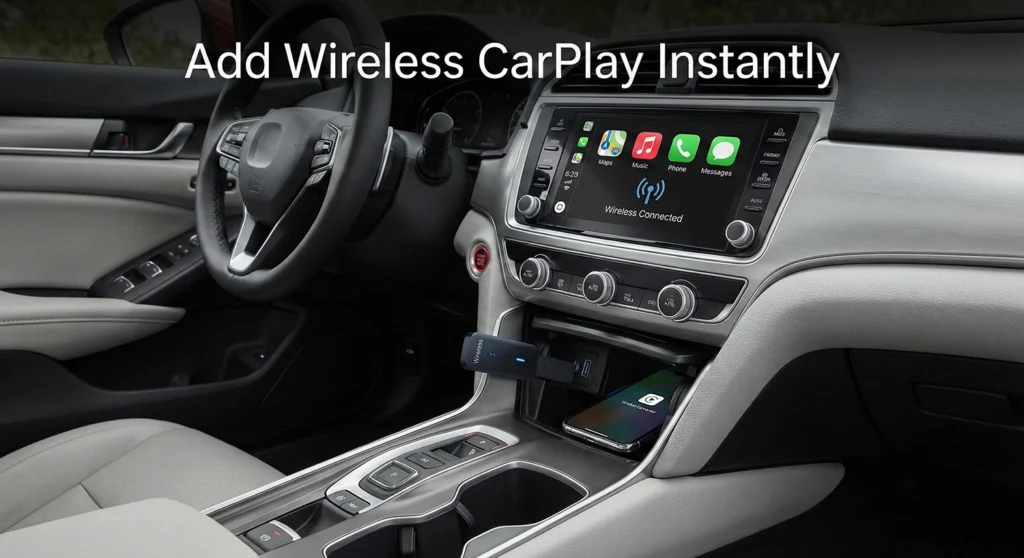
Many vehicles manufactured between 2016 and 2020 are equipped with infotainment systems that lack wireless connectivity features now standard in newer models. These limitations restrict access to modern smartphone integration, including wireless Apple CarPlay and Android Auto. A wireless CarPlay adapter for older cars provides a practical method to enable these features without replacing the vehicle or the factory infotainment unit.
Wireless adapters act as intermediary devices that allow smartphones to connect wirelessly to existing systems. This approach supports navigation, communication, and media playback while maintaining the original dashboard configuration. The solution addresses compatibility gaps between older vehicles and current mobile operating systems.
Understanding Wireless CarPlay and Android Auto
Wireless CarPlay and Android Auto enable direct smartphone integration with a vehicle’s infotainment display without a physical cable connection.
Key characteristics include:
- Wireless Bluetooth and Wi-Fi-based connectivity
- On-screen access to smartphone applications
- Voice-controlled interaction through supported assistants
Supported functions typically include:
- Navigation applications such as Google Maps and Waze
- Music streaming services such as Spotify and Apple Music
- Hands-free calling and messaging
A wireless CarPlay adapter for older cars enables these functions when factory systems support wired CarPlay or Android Auto but lack wireless capability.
Limitations of Infotainment Systems in Older Vehicles
Infotainment systems in vehicles produced between 2016 and 2020 commonly present the following limitations:
- Wired-only smartphone connectivity
- Restricted application compatibility
- Absence of wireless navigation and media controls
These constraints affect usability and increase driver interaction with physical cables. Wireless adapters resolve these limitations by extending existing system functionality rather than replacing it.
Hardware Options for Enabling Wireless Connectivity
Several hardware approaches are available for adding wireless CarPlay and Android Auto:
Wireless CarPlay Adapters
- Connect through the vehicle’s existing USB port
- Preserve the original infotainment system
- Require compatibility with factory wired CarPlay or Android Auto
Replacement Head Units
- Offer integrated wireless support
- Include additional features such as higher-resolution displays
- Require dashboard modifications and additional components
Installation Accessories
- Wiring harnesses
- Dash mounting kits
- Vehicle-specific connectors
Selecting hardware requires verifying compatibility with the vehicle’s make, model, and infotainment system version.
A compact 2-in-1 wireless CarPlay and Android Auto adapter that converts your factory wired system into a fast, stable wireless experience with plug-and-play convenience and automatic reconnection.
- Fast & Stable Connection: Dual-band 2.4GHz + 5GHz chipset delivers smooth, low-latency wireless CarPlay and Android Auto.
- Ultra-Mini Premium Design: Credit-card-sized aluminum body with excellent heat dissipation and a clean, clutter-free look.
- Plug & Play Auto-Reconnect: No apps needed—pairs quickly and reconnects automatically every time you start the car.
- Wired CarPlay Required: Only works with vehicles that already support factory wired CarPlay (typically 2016+ models).
- No Video Playback: Does not support YouTube or Netflix for safety reasons.
- Software Dependency: Requires periodic firmware updates to maintain optimal compatibility and stability.

A compact 2-in-1 wireless CarPlay and Android Auto adapter that upgrades factory wired systems to a fast, seamless wireless experience with instant auto-reconnect and a clean, flush-fit design.
- Fast Auto-Reconnect: Pairs once and reconnects automatically in under 3 seconds using dual-band 2.4GHz + 5GHz Wi-Fi.
- True 2-in-1 Support: Works with both iPhone (iOS 10+) and Android (Android 11+), ideal for mixed-device households.
- Ultra-Compact & OEM Feel: Flush-fit minimalist design preserves original controls (touchscreen, steering wheel, voice).
- Wired System Required: Only works with cars that already have factory wired CarPlay or Android Auto.
- No Video Apps: Does not support video playback apps for safety reasons.
- Wireless Variability: Performance may vary slightly depending on vehicle system and phone model.

An all-in-one portable wireless CarPlay screen with an 8.1" touchscreen and built-in 2K dash cam, combining smart navigation, hands-free control, and advanced driving safety features in one easy-to-install system.
- 2K Dash Cam + 1080P Rear Camera: Front 2K recording with loop recording and G-sensor, plus a full HD backup camera for safer driving and parking.
- Wireless CarPlay & Android Auto: Fast, cable-free connection with stable performance and full support for voice control via Siri and Google Assistant.
- Portable Plug & Play Design: Easy installation via cigarette lighter, compatible with most 12–24V vehicles without dashboard modification.
- External Screen Required: Sits on the dashboard and may not match built-in factory aesthetics.
- Limited Audio Integration: Sound output relies on Bluetooth or AUX rather than direct factory wiring.
- Screen Size Preference: 8.1" display may feel small for users accustomed to larger in-dash systems.

Installation Process Overview
The installation of a wireless CarPlay adapter for older cars generally follows a standardized process:
- Verify adapter compatibility with the vehicle.
- Connect the adapter to the vehicle’s USB port.
- Power on the vehicle infotainment system.
- Pair the smartphone via Bluetooth.
- Complete wireless configuration using on-screen prompts.
Post-installation testing ensures stable connectivity and confirms access to supported applications.
Device Configuration and Connectivity
iOS Devices
- Enable Bluetooth on the iPhone.
- Pair with the adapter through Bluetooth settings.
- Configure CarPlay preferences under system settings.
Android Devices
- Activate Bluetooth on the device.
- Pair through connected device settings.
- Grant required permissions for Android Auto functionality.
Troubleshooting steps typically include restarting devices, updating firmware, and ensuring sufficient power supply.
Optimizing User Experience
To maximize functionality:
- Organize application layouts on the infotainment display
- Disable unsupported or unused applications
- Maintain updated smartphone and adapter firmware
Supported applications designed specifically for CarPlay and Android Auto provide optimized interfaces for in-vehicle use.
Cost Considerations and Budget Planning
Typical cost ranges include:
- Wireless CarPlay adapter: $100–$300
- Optional professional installation: $50–$150
Self-installation reduces overall expenses. Wireless adapters provide a cost-effective alternative to full head unit replacement while extending vehicle technology lifespan.
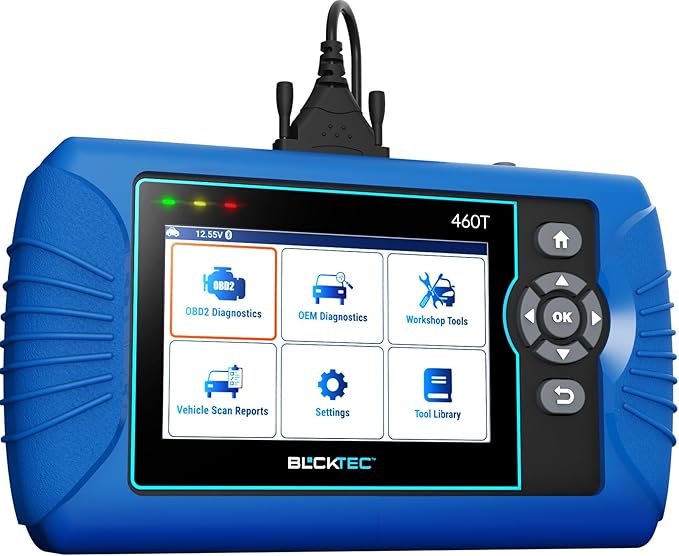
A professional-grade OBD2 diagnostic scanner that delivers full system diagnostics, advanced reset services, and real-time live data—ideal for DIY users and mechanics who want dealer-level insight without subscriptions.
- All-System Diagnostics: Reads and clears Engine, Transmission, ABS, and SRS codes with detailed live data and freeze-frame analysis.
- 12+ Reset Services: Supports Oil, TPMS, EPB, BMS, SAS, DPF, Throttle Relearn, ABS Bleeding, and more.
- Fast & Smart Operation: AutoVIN, AutoScan, and AutoReLink enable quick plug-and-play scanning with free lifetime updates.
- Region Locked: Works only in the USA and Canada.
- Vehicle-Dependent Functions: Not all reset features are supported on every car model.
- Wired Use Only: Requires a physical OBD2 connection with no standalone wireless scanning.
Suggested Internal Links
To provide additional context around smart technology, productivity tools, and innovative accessories, the following related articles can be internally linked within this topic:
- Discover the Best Innovative Products for Everyday Life
- Amazon Finds for Productivity
- Trending Amazon Finds: The Must-Have
Recommended placement:
Insert this section near the end of the article, immediately before the conclusion, under an H2 or H3 heading to support topical relevance and internal SEO structure.
FAQs:
What is a wireless CarPlay adapter for older cars?
A device that enables wireless Apple CarPlay and Android Auto on vehicles with wired-only infotainment systems.
Does the vehicle need wired CarPlay support?
Yes, most adapters require existing wired CarPlay or Android Auto capability.
Is professional installation required?
No, most adapters are designed for consumer installation.
Are all smartphone apps supported?
Only applications approved for CarPlay or Android Auto compatibility are supported.
Can wireless connectivity affect performance?
Performance depends on adapter quality, firmware updates, and device compatibility.
Conclusion
A wireless CarPlay adapter for older cars enables wireless Apple CarPlay and Android Auto without replacing factory infotainment systems. The upgrade improves navigation access, media control, and hands-free communication while maintaining compatibility with existing hardware. This approach modernizes vehicle functionality efficiently and economically.